

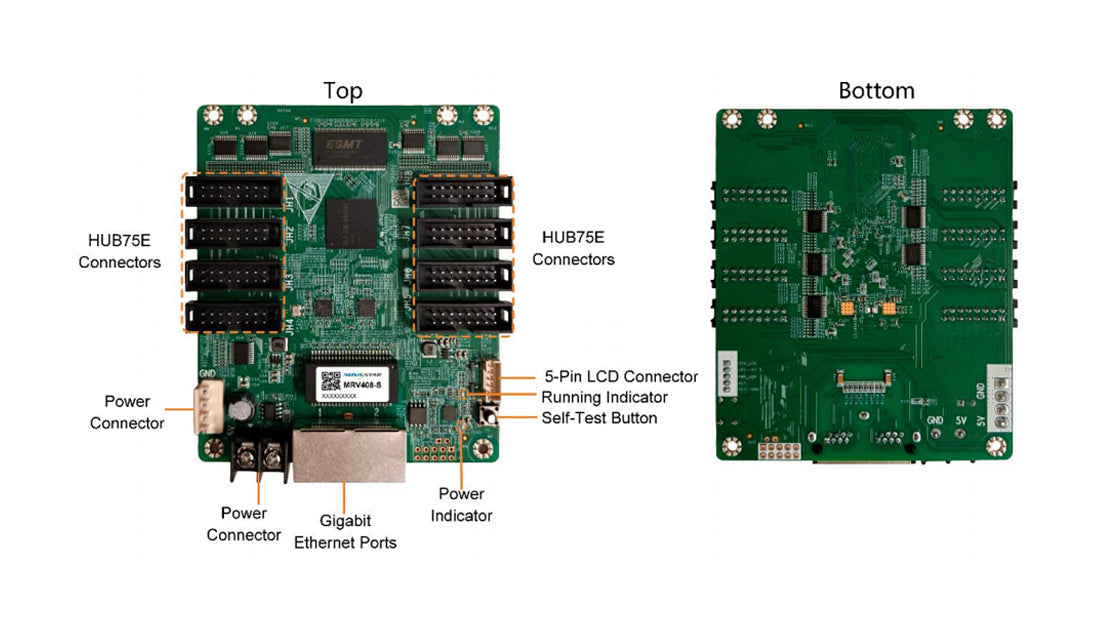
Description
MRV408-S is a general receiving card developed by NovaStar Tech Co., Ltd. (hereinafter referred to as NovaStar). Supporting various functions such as Color Management, 18bit+, Pixel Level Brightness and Chroma Calibration, Quick Adjustment of Dark or Bright Lines, Multi-batch Adjustment, Low Latency, 3D, Individual Gamma Adjustment for RGB and 90° Image Rotation,the product can significantly improve the display effect and user experience.
Features
Improvements to Display Effect
Color Management
Support standard (Rec.709 / DCI-P3 / Rec.2020) and custom color gamuts, enabling more precise colors on the screen.
18bit+
Improve the LED display grayscale by 4 times to avoid grayscale loss due to low brightness and allow for a smoother image.
Pixel Level Brightness and Chroma Calibration
Work with NovaStar's calibration system to calibrate the brightness and chroma of each pixel, effectively eliminating differences and enabling high consistency for both brightness and chroma.
Quick Adjustment of Dark or Bright Lines
The different brightness of seams caused by splicing of modules or cabinets can be corrected to improve the visual experience. The correction is easy and takes effect immediately.
Multi-batch Adjustment
Adjust the brightness and chroma of cabinets or modules to minimize display discrepancies caused by variations in production batches.
Low Latency
Low Latency is enabled by default. When enabled, the latency of the video source at the receiving card end can be reduced to 1 frame (only when using modules with driver IC with built-in RAM).
3D
Work with the controller that supports 3D function to enable 3D output.
Individual Gamma Adjustment for RGB
Working with NovaLCT and the controller that supports this function, the receiving card supports individual adjustment to red gamma, green gamma and blue gamma, which can effectively control image non-uniformity at low grayscale conditions and white balance offset, allowing for a more realistic image.
90° Image Rotation
The display image can be rotated in multiples of 90° (0°/90°/180°/270°).
Free Image Rotation
Support image rotation at any angle when using the dedicated MCTRL R5 controller and SmartLCT software.
Calibration Coefficient Management
The calibration coefficients can be uploaded, read back, saved to hardware, and erased.
Uploading Calibration Coefficients
Upload calibration coefficients to the receiving card quickly or in a stable manner, with acceleration support if needed.Improvements to Maintainability
Data Group Mapping
Display the test pattern by data group to clearly show the position of each data group within
the cabinet.
Mapping 2.0
Within a single device, differentiate Ethernet ports using various background colors. It automatically adapts to the resolution of different cabinets to assign the appropriate controllers, ports, and receiving card numbers. This provides a clear visualization of the receiving card's physical location and wiring. Cabinet resolution mapping supports a minimum of 36×20 pixels.
Settings of a Stored Image in the Receiving Card
The image displayed during startup, or displayed when the Ethernet cable is disconnected or there is no video signal.
Temperature and Voltage Monitoring
The receiving card temperature and voltage can be monitored without using peripherals.
Cabinet LCD
The LCD module of the cabinet can display the temperature, voltage, single runtime and total runtime of the receiving card.
Bit Error Detection
Monitor the number of erroneous packets in the Ethernet data transmission of the receiving card to help troubleshoot network communication problems.
Detection of Ethernet Cable Disconnections
Monitor the number of times the Ethernet cable to the receiving card is disconnected,assisting in identifying potential communication link issues.
Firmware Program Readback
The receiving card firmware program can be read back and saved to the local computer.
Configuration Parameter Readback
The receiving card configuration parameters can be read back and saved to the local computer.
Improvements to Reliability
Loop Backup
The receiving card and controller form a loop via the primary and backup line connections.When a fault occurs at a location of the lines, the screen can still display the image normally.
Dual Backup of Configuration Parameters
The receiving card configuration parameters are stored in both the application area and factory area of the receiving card at the same time. Users usually use the configuration parameters in the application area. If necessary, users can restore the configuration parameters in the factory area to the application area.
Dual Program Backup
Two copies of the firmware program are stored in the receiving card at the factory to avoid the problem that the receiving card may get stuck abnormally during program update.